
Excel as a CRM: The Disadvantages in 2026 and Why Spreadsheets Slow Your Growth

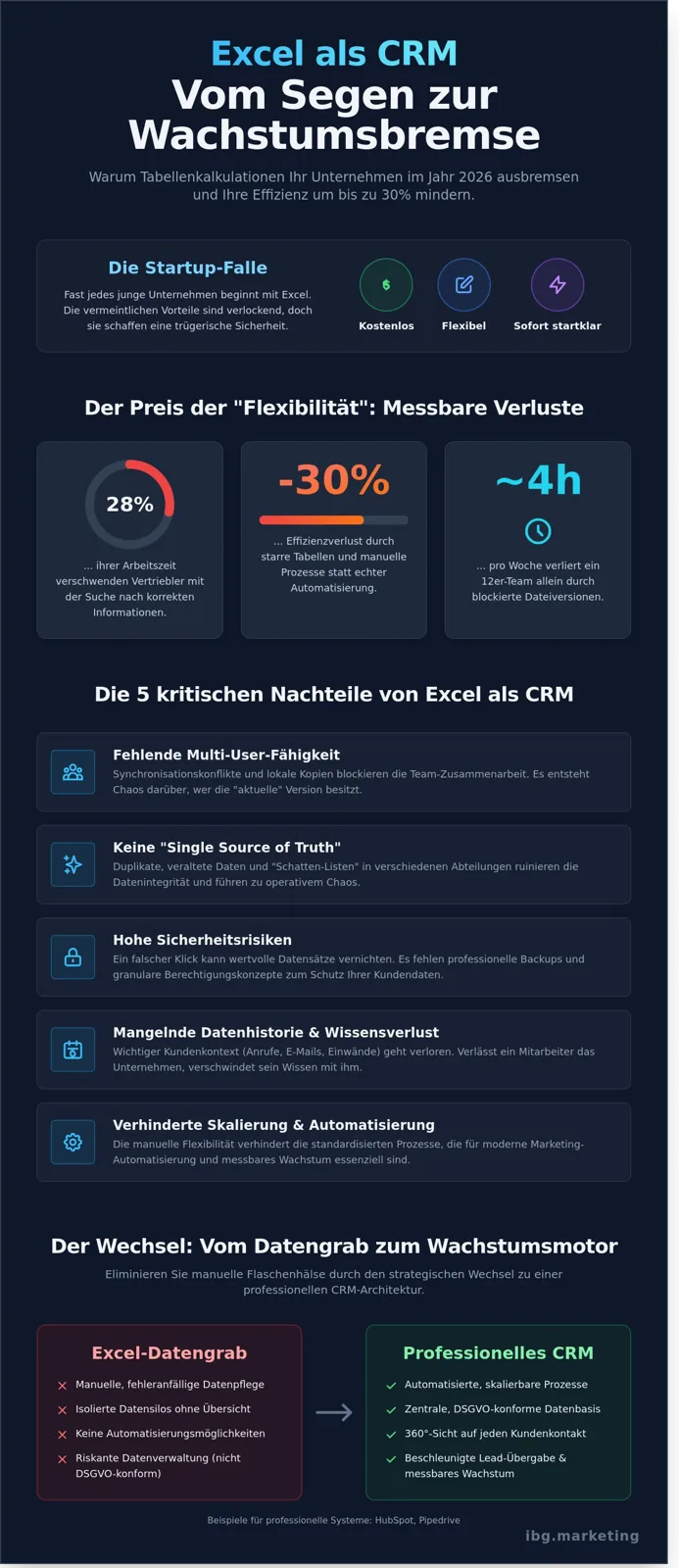
On an average Tuesday in 2025, a 12-person team in Munich loses nearly 4 working hours simply because the master spreadsheet is locked up by three different file versions. What started as a pragmatic solution at launch quickly turns into a massive brake on the growth of your entire business. Excel is an excellent tool for isolated calculations, but the specific disadvantages of using Excel as a CRM weigh heavier than ever in the dynamic market environment of 2026.
On top of that, Excel falls apart when it comes to complex reporting. While you painstakingly build pivot tables for the monthly close in a spreadsheet, modern systems deliver real-time dashboards at the push of a button. Data-driven decisions require current figures, not reports manually stitched together the night before. If you want to professionalize your processes, we should talk about your individual system landscape – for additional strategic consulting and AI-powered management tools, click here.
You surely appreciate the initial flexibility of spreadsheets for quickly capturing your first leads. We understand that well. But anyone who really wants to scale needs genuine data integrity instead of manual copy-and-paste work. In this article, you will learn exactly why rigid spreadsheets cut your efficiency by up to 30 percent and how, with modern systems like HubSpot or Pipedrive, you can create a central, GDPR-compliant data foundation. We show you the path from error-prone manual work to automated processes that finally take your marketing and sales to a new level.
Key Takeaways
• Learn why the supposed flexibility of spreadsheets becomes a dangerous efficiency trap and a massive brake on growth as teams expand.
• We analyze the critical disadvantages of Excel as a CRM, from the lack of multi-user capability to risky security gaps in data management.
• Discover how integrating professional CRM systems eliminates manual bottlenecks and finally makes your marketing automation scalable.
• Get to know the strategic roadmap for successfully mastering the switch from confusing data graveyards to a high-performing CRM architecture.
• Gain hands-on insights into how modern tool landscapes speed up your lead handovers and generate measurable growth for your company.
The status quo: why Excel is often the first choice as a CRM substitute
Almost every startup in Munich begins its journey in a plain spreadsheet. It is the classic startup trap. You quickly need an overview of your first contacts, and Excel is installed on every computer. It seems to cost nothing extra. At first, the flexibility feels like an unfair advantage for the young team. But this is exactly where the first mistakes in customer relationship management (CRM) arise, the ones that later put a massive brake on growth. The psychological barrier is high. Teams get used to their familiar structures. They love the freedom to move columns around at will or tweak formulas on the fly. For a freelancer or a micro-business with two clients, that may be enough. But as soon as 5 to 15 employees access the same data, that habit becomes a hazard. The supposed speed of spreadsheets masks their structural deficits. To better understand the scope of this problem for your company, this video shows the classic pitfalls of digital sales:The flexibility of Excel: a blessing and a curse at once
The unlimited customizability is treacherous. Every employee builds their own logic. In the marketing department, a column is called "lead source," while sales talks about "acquisition channel." Dangerous shadow lists spring up across different departments. Data is maintained redundantly and often contradicts itself after just a few weeks. Clean scaling is impossible when no unified data foundation exists. This is one of the most serious disadvantages of Excel as a CRM in 2026. Manual flexibility prevents the automation that is essential for modern WhatsApp Marketing or performance ads.Free tools vs. opportunity costs
Many founders look only at the monthly license fees. They compare €0 for Excel with the cost of professional solutions like HubSpotThe critical disadvantages of Excel as a CRM: an analysis for 2026
Excel is an excellent tool for calculations, but a risky foundation for customer relationships. In 2026, speed is the most important currency in sales. Static spreadsheets put a massive brake on this process. One of the biggest disadvantages of Excel as a CRM is the lack of multi-user capability. When three team members edit data at the same time, synchronization conflicts arise. Who owns the current version? Important leads often end up in local copies on desktops in Munich or in the home office, which makes collaboration impossible.
Data security is another critical area. A wrong click or an accidentally deleted row can wipe out records that took great effort to build. Without a professional backup structure and granular permission concepts, your most valuable asset, your customer data, remains unprotected. Professional teams can no longer afford this risk if they want to scale profitably.
The end of the single source of truth
Without a central data foundation, operational chaos reigns. Duplicates and outdated phone numbers ruin your sales team's efficiency. Studies show that sales reps in SMBs waste up to 28% of their working time searching for correct information. Excel offers no native history. You see an email address, but not the context: what was discussed with the customer on May 14? What objections came up in the last call?
This lack of transparency leads to a dangerous loss of knowledge. When an employee leaves your company, the implicit knowledge about the customer relationship often disappears with them. In a dynamic agency landscape, this dependence on individuals is a growth stopper. A clean data structure is the prerequisite for any form of automation.
GDPR compliance in customer management
In 2026, Excel lists are a high-risk legal area for German companies. The GDPR requires a complete log of access and changes. Who viewed which data and when? In a shared spreadsheet, that is technically almost impossible to trace. Enforcing deletion deadlines and rights of access also becomes a bureaucratic nightmare when data is scattered across different worksheets.
A modern, legally secure setup is no longer a luxury today, but a matter of survival. A professional CRM system provides the necessary security here through automated workflows and built-in compliance tools. That protects you from severe fines, which can be existential threats, especially for growing startups.
On top of that, Excel falls apart when it comes to complex reporting. While you painstakingly build pivot tables for the monthly close in a spreadsheet, modern systems deliver real-time dashboards at the push of a button. Data-driven decisions require current figures, not reports manually stitched together the night before. If you want to professionalize your processes, we should talk about your individual system landscape.
Scaling impossible: how spreadsheets block your marketing automation
Excel is a functional dead end for your modern marketing ecosystem. Anyone still transferring leads by hand from Meta or Google Ads into a spreadsheet in 2026 is actively burning budget. Response time is the decisive factor in digital sales. Studies prove that the chance of a successful qualification drops sevenfold when the first outreach takes longer than 60 minutes. Static spreadsheets systematically force this delay. This is where the serious disadvantages of Excel as a CRM show: the bridge to the rest of your tech stack is missing.
Manual lead handovers create a dangerous bottleneck for your performance ads. While your competitors feed data back in real time via the Conversions API, your information stays trapped in a closed file. That not only prevents fast action, but also precise retargeting. Without an automated data flow, algorithms from Meta or TikTok cannot learn which leads actually convert. Your growth is artificially capped by spreadsheets while the competition races past you.
Zapier workflows: the magic of connection
An efficient Zapier process automation requires dynamic data sources. Static spreadsheets do not allow clean triggers to set off complex chain reactions. In a modern setup, a lead from a Meta ad lands directly in the CRM, triggers an internal Slack message and starts a personalized email sequence. For clients like Bridgewave, we cut the processing time of leads by 45% through automations like these. Excel offers no API interfaces that enable this level of agility. Anyone who scales needs systems that work in the background on their behalf.
WhatsApp funnels and CRM integration
Conversational commerce is the standard for 2026. Professional WhatsApp Marketing needs a dynamic backend that stores and synchronizes chat histories centrally. Customers expect every employee to know immediately what was discussed in the chat. With Excel, that is technically impossible to implement. There is no way to send automated follow-ups based on CRM triggers. Instead, you would have to copy numbers manually into lists, which is not only inefficient but also risky under data-protection law. A CRM lets us steer interactions precisely and massively increase the conversion rate through targeted trigger messages.
As specialists for agile tech stacks in Munich, we know: only those who let their data flow can scale profitably. Excel may work for accounting, but in marketing it is the anchor that stops your ship from setting sail. Real performance comes from connectivity, not from isolated worksheets.
Moving from Excel to a CRM: strategies for mid-sized businesses
Switching from rigid spreadsheets to a dynamic system is not purely an IT project. It is a strategic decision for your growth. Many companies in Munich that we work with at IBG Marketing only realize late how massively the disadvantages of Excel as a CRM slow their scaling. A structured switch happens in four phases.
First, we take stock. Which data sits in which spreadsheets? Often information about a single customer is spread across five different files. In the second step, we choose the right tool. Here the priority is not the maximum number of features, but the perfect fit for your processes. The third step is data cleansing. We eliminate duplicates and outdated contacts before the import starts. The final step is training. A CRM is only as strong as the team that operates it.
Choosing the right system for 2026
The decision between different providers depends on your growth strategy. For companies with a strong focus on content and inbound generation, HubSpot is usually the first choice. The platform unites marketing, sales and service in one ecosystem. That is ideal for mapping the customer journey seamlessly.
Pure sales teams that rely on efficient pipeline management and fast prospecting often benefit more from Pipedrive. It is intuitive and optimized for the quick close. Agile startups should make sure the tool landscape stays extensible through interfaces like Zapier. That way you avoid replacing old disadvantages of Excel as a CRM with new isolated software islands.
Data migration without headaches
A faulty import instantly destroys the team's trust in the new system. We follow the principle: quality over quantity. Before mapping the Excel columns to CRM properties comes radical cleansing. Outdated leads from 2021 have no place in your new system.
Mapping
Every Excel column has to be assigned to a clear field in the CRM.
Validation
Test imports with 50 records surface formatting errors early.
Automation
During the transition phase, we use tools to keep data in sync until the team has fully switched over.
Successful clients like Brera or Bridgewave have shown that a clean data core boosts sales productivity by up to 30 percent. A CRM is not an archive, but a machine for your revenue.
Part of going professional is also the right management of productivity platforms. For companies operating in Brazil that value local invoicing, Cloud2b offers the option to comprar licença clickup com nota fiscal brasileira.
Do you want to finally replace your outdated spreadsheets with a high-performing system? Book a free strategy call now.
CRM excellence with IBG: from data graveyard to growth engine
Static spreadsheets are the natural enemy of scaling. IBG Marketing ends the manual data chaos in your Munich startup and transforms your customer management into a genuine profit center. We have already guided numerous projects like Brera in breaking up outdated structures and replacing them with high-performing systems.
The disadvantages of Excel as a CRM weigh heavier in 2026 than ever before, because speed decides market success. That is why we do not build isolated tools, but integrated growth systems. We link your CRM directly to your performance ads to convert leads without losing time.
By using professional tools like HubSpot, Pipedrive or Zapier, we create an infrastructure that grows with your success. Data is not just managed, but actively used for sales. That is the decisive lever for modern companies.
Measurable results through data-driven strategies
A CRM only delivers value when the data is valid. We optimize your marketing KPIs through seamless tracking across the entire funnel. That way you see exactly which channel delivers the highest customer lifetime value.
Automated nurturing tracks make sure no lead disappears into the void again. This significantly increases the ROI of your campaigns, because the close rate rises through targeted follow-ups. Transparency in the sales funnel also allows you to allocate your budget precisely for the coming quarter.
Your partner for CRM implementation
You will look in vain for off-the-shelf standard setups with us. We analyze your individual sales processes and map them digitally with a perfect fit. Our approach is holistic: we advise, implement and train your team for maximum adoption of the new software.
As part of our monthly retainers, we continuously optimize your system further. We adapt workflows to market changes and identify new automation potential. That keeps your CRM strategy agile and competitive in 2026 too. We are your external growth engine, based in Munich.
Let us scale your sales process together in 2026. Book a free strategy call now.
Meta-Description: Learn why Excel slows your growth. IBG Marketing solves Excel chaos through CRM automation. Book a free strategy call in Munich now!
From data graveyard to scalable growth engine
In 2026, static spreadsheets are the biggest obstacle to your scaling. The disadvantages of Excel as a CRM are clearer today than ever: manual data maintenance destroys valuable working time, while the lack of real-time interfaces to tools like HubSpot slows your entire marketing automation. Anyone who wants to grow sustainably needs a system that actively supports and thinks along. In successful implementations for Brera and Bridgewave, we have shown how the switch to automated CRM landscapes massively boosts efficiency. As experts in Zapier automation and official partners of leading platforms, we build the technological foundation for your digital edge right here in Munich. Your team deserves professional tools that accelerate sales instead of holding them back with faulty formulas and duplicates. Rely on data-driven decisions and leave the spreadsheet chaos behind for good. Your business success in 2026 begins with a clean, scalable infrastructure.
Let us take your CRM to the next level together in 2026 – contact us here.
Frequently asked questions about switching from Excel to a CRM
What are the biggest disadvantages of Excel as a CRM compared to HubSpot?
The biggest disadvantages of Excel as a CRM lie in the lack of automation and the limited scalability for growing companies. While Excel remains a static spreadsheet, HubSpot offers a dynamic 360-degree view of your customer interactions in real time. In our daily work in Munich, we often see teams lose up to 15 hours per week to manual data maintenance. A professional CRM eliminates these time-wasters through automated workflows and makes sure no more leads get lost in confusing rows.
Does a CRM system already make sense for a small team of 5 employees?
A professional CRM absolutely makes sense for a team of 5 employees, because it creates the foundation for efficient processes and measurable growth. Small teams have to make the most of their resources, which is barely possible without a central data foundation. Studies prove that companies without a CRM squander around 25% of their revenue potential through poor lead management. By using tools like Pipedrive or HubSpot, you make sure information does not disappear into private inboxes, but is instantly available to every team member.
How safe is my customer data in Excel compared to a cloud CRM?
Cloud CRM systems offer significantly higher security than local Excel files, thanks to granular access controls and state-of-the-art encryption. An Excel spreadsheet can easily be copied, accidentally deleted or emailed to unauthorized people, which poses a massive GDPR risk. Professional providers like Brevo guarantee compliance with European data-protection standards and store data on certified servers. For our clients at IBG Marketing, this security is the basis for trusting customer relationships and protects against costly data breaches.
Can I simply import my existing Excel lists into a CRM?
Importing your existing data from Excel into a modern CRM system happens via standardized CSV interfaces and often takes only a few minutes. Most tools have intelligent mapping assistants that automatically assign your columns to the right data fields. We support companies in cleansing their legacy data before the import, so as to eliminate the typical disadvantages of Excel as a CRM, such as duplicates or outdated contacts, right away. That way you start with a clean database that is immediately usable for targeted marketing campaigns.
How long does the switch from Excel to a professional CRM system take?
The technical setup and data migration from Excel to a CRM system usually take between 14 and 30 days. This time frame covers configuring your individual sales pipeline, connecting tools via Zapier and the first team trainings. While the system is technically ready quickly, we count on about 3 months until the new processes have become second nature to employees. We actively accompany this change process so your team in Munich can quickly refocus on what matters: your revenue.
Turn this into results.
Branding, lead generation and done-for-you funnels, engineered with AI, live in weeks.
Book a free callChat on WhatsAppKeep reading

How to Set Up Automated Lead Rotation in HubSpot 2026: The Ultimate Guide
Set up automated lead rotation in HubSpot for 2026: cut response times, distribute leads fairly, and scale your sales team without
Read · 13 min →
Generating B2B Leads With Google Ads 2026: Strategies for Scaled Growth
Learn how to generate B2B leads with Google Ads in 2026: precise targeting, CRM automation with HubSpot and Zapier, and WhatsApp f
Read · 16 min →
CRM Implementation Checklist 2026: The Ultimate Guide for Agile Startups
Skip the costly CRM mistakes. This 2026 implementation checklist walks agile startups through strategy, data migration, and change
Read · 15 min →