
How to Set Up Automated Lead Rotation in HubSpot 2026: The Ultimate Guide

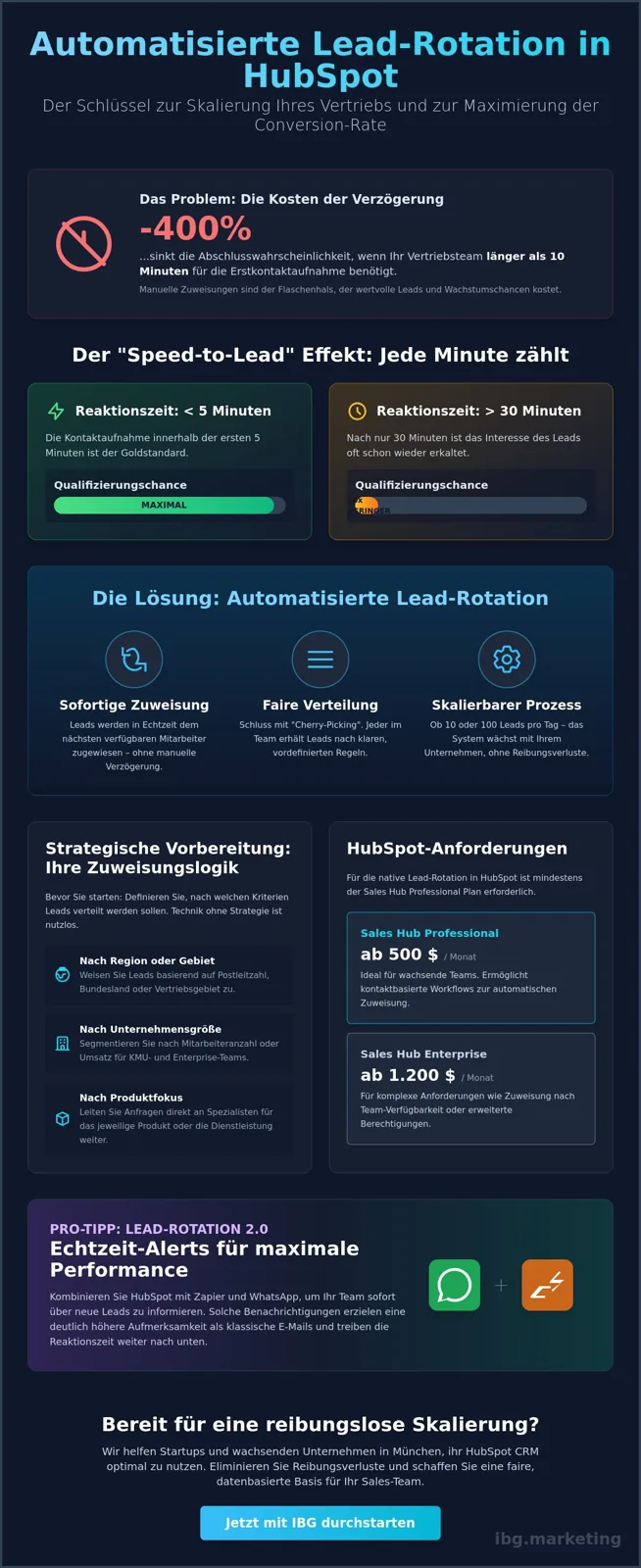
Did you know that the likelihood of closing drops by a full 400% when your sales team takes longer than 10 minutes to make first contact? In fast-growing startups here in Munich, time is the hardest currency there is. Yet valuable contacts often sit untouched, because manual assignment slows the workflow and breeds unfairness within the team. When you set up automated lead rotation in HubSpot, you eliminate these delays instantly and create a fair, data-based foundation for your sales team. At IBG - Innovate Business Growth, we know from working with clients like Brera and Bridgewave that efficient lead management is the decisive lever for real scalability.
In this guide, you will learn how to automate your lead assignment perfectly in order to shorten response times and scale your sales team efficiently. Since these features require at least the HubSpot Sales Hub Professional plan, currently priced at $500 per month, we show you exactly how to turn this investment into measurable ROI. We walk you through the technical implementation of the workflows, explain the logic behind fair distribution, and give you strategies to significantly shorten your closing cycles as early as next quarter.
Key Takeaways
• Learn why the speed-to-lead factor decides your sales success and how to cut response times to under 5 minutes.
• Before you set up automated lead rotation in HubSpot, learn how to strategically define assignment logic by region or company size.
• Master the technical implementation using contact-based workflows and precise enrollment triggers for seamless assignment.
• Discover how, by combining WhatsApp and Zapier, you can create real-time alerts that get significantly more attention than classic emails.
• Establish a fair and transparent system that motivates your sales team and lays the foundation for smooth scaling in Munich.
What is automated lead rotation and why is it essential in 2026?
Automated lead rotation is far more than just a technical feature; it is the digital backbone for any sales team that seriously wants to scale in 2026. At its core, it is about distributing incoming contacts to the right sales reps instantly and without manual intervention, according to predefined rules. Anyone who has automated lead rotation set up in HubSpot professionalizes the fundamentals of lead management and eliminates the human bottleneck in assignment.
The speed-to-lead factor is the most important lever for your conversion rate today. Data shows that the likelihood of qualifying a lead drops tenfold when the response time rises from 5 to 30 minutes. In a dynamic market environment like Munich, where agile startups compete for the same talent and customers, the speed of first contact often decides the entire outcome of a deal. Manual processes are simply too slow for the expectations of modern B2B buyers.
To better understand the underlying mechanics, let us take a look at this tutorial from HubSpot DACH:
An often underestimated aspect is internal team hygiene. Without clear automation, "cherry-picking" inevitably emerges, where experienced reps grab the supposedly easiest or most lucrative leads first. That causes frustration and demotivates new team members. Setting up automated lead rotation in HubSpot means building fairness and transparency deep into your company culture. Every lead is assigned by objective criteria, which massively improves collaboration.
The benefits for your sales team
Higher motivation
With fair distribution, no one feels disadvantaged; that strengthens team spirit for the long run.
Administrative relief
Team leads save valuable hours every week, because they no longer have to check and assign leads by hand.
Precise data quality
HubSpot documents every lead owner seamlessly, which enables clean reporting and clear accountability.
Requirements: Sales Hub Professional vs. Enterprise
To use rotation natively in HubSpot, you need at least the Sales Hub Professional plan. This currently starts at $500 per month for 5 users. For more complex requirements, such as distribution based on team availability or advanced permissions, the Enterprise plan (from $1,200 per month for 10 users) is the right choice. As part of a HubSpot CRM implementation, we help you choose the license tier that best supports your growth goals and avoids unnecessary costs.
Strategic preparation: the right logic for your lead distribution
Technology without strategy is a costly investment with no return. Before you set up automated lead rotation in HubSpot, you have to mirror your internal sales structure precisely. Many startups make the mistake of distributing leads at random; that leads to inefficiency and untapped potential. First analyze which criteria are decisive for your success. Are your assignments based on geographic regions, company size or specific product focuses? A Munich startup focused on enterprise clients needs a completely different logic than a SaaS provider in the SMB segment.
A decisive factor in the preparation is synchronizing availability. Automation does little good if a lead is assigned to a rep who is currently on vacation or stuck in meetings. Modern sales automation technologies now make it possible to factor in calendar data in real time. Clients like Brera use scalable processes like these to make sure requests always land with the expert who can act immediately. The goal is a system that breathes with your growth and minimizes friction.
Round robin vs. weighted rotation
The classic round-robin method distributes leads evenly in a circular fashion. That is fair and ideal for teams where all reps have a similar level of experience. But in 2026, more and more companies are turning to weighted rotation. Here, top performers receive a higher percentage of the leads. Why? Because data shows that experienced sales pros achieve a higher close rate on complex deals. When you set up automated lead rotation in HubSpot, you should check whether a 60/40 split between senior and junior sales makes more sense for your current phase than strict equal treatment.
Lead qualification as a trigger
Rotation should never start with unfiltered junk data. Define clear criteria for marketing qualified leads (MQLs) and sales qualified leads (SQLs) before the workflow kicks in. Only validated requests should reach the sales team, so as not to dilute its focus. This filtering is closely tied to your marketing KPIs for 2026. When the quality of the leads is right, the team's acceptance of the automation increases massively. Clean lead scoring serves as the ideal starting point for any rotation logic.
Unsure which distribution logic fits your business model? Let us optimize your sales strategy together and build a system that truly converts.
Step-by-step guide: setting up automated lead rotation in HubSpot
Let us jump straight into the technical implementation. When you set up automated lead rotation in HubSpot, you always start with a contact-based workflow. The goal is a seamless chain from the first click to the personal outreach. A precise technical implementation is the foundation of an effective lead management strategy that does not just exist on paper, but delivers real results in the day-to-day work of your sales team in Munich.
The first critical point is the enrollment triggers. Here you define when a contact enters the rotation at all. Use specific form submissions or a change of the lifecycle stage to "sales qualified lead" for this. Make sure you set the re-enrollment options correctly, in case leads should be re-qualified and redistributed after a certain time. Without clean triggers, either too much junk data ends up in the pipeline or valuable opportunities seep away unused.
Once the trigger is in place, add the "rotate records" workflow action. Here you select the "contact owner" property. HubSpot now gives you the option to distribute the leads either to specific users or to entire teams. For agile startups with 5 to 15 employees, team-based assignment is often the most scalable solution, because new employees can simply be added to the group without having to adjust the workflow manually every time.
Configuring the workflow action
In the detailed configuration, you decide on the distribution logic. By default, HubSpot uses the round-robin method. Important: actively decide whether existing lead owners should be overwritten. In most cases, it is advisable to tick "do not overwrite existing owner," so as not to interrupt sales conversations that have already begun with a sudden change of responsibility. Combine this directly with an internal notification via in-app alert or email, so the new owner can act right away.
Testing and validating the workflow
Before you switch the workflow "live," using HubSpot's test function is mandatory. Select 3 to 5 test contacts and simulate the run. Check in the history whether the assignment actually went to the right people. We recommend monitoring the distribution closely for the first 48 hours after going live. If misassignments occur, it is usually due to incomplete records or contradictory trigger logic. A stable system is the basis for our HubSpot CRM implementation, which we optimize individually for our clients.
Lead rotation 2.0: WhatsApp and Zapier for maximum performance
The classic email notification has a massive problem in 2026: it gets lost in the digital noise. For sales teams in Munich that are tuned for maximum efficiency, a mere inbox is no longer enough. Anyone who wants to set up automated lead rotation in HubSpot today has to think one step further. At IBG - Innovate Business Growth, we increasingly rely on real-time alerts via WhatsApp to radically cut response times. A sales rep who receives a push notification straight to their smartphone acts faster and more motivated than someone who first has to open the desktop client.
This is where Zapier process automation comes into play. While HubSpot already offers excellent rotation features natively, Zapier enables connections to external databases or complex logic that goes beyond the standard. For example, you can implement weighted distributions that factor in data from third-party systems or process specific information from specialized lead-scoring tools. The result is a highly flexible system tailored exactly to your startup's individual growth phases, minimizing friction during handovers.
WhatsApp Marketing in the sales funnel
Reaching out to a lead directly via WhatsApp immediately after assignment is the game changer for your conversion rate. By using the WhatsApp Business API, integrated through partners like Brevo, the entire process stays 100% GDPR-compliant. In our WhatsApp Marketing Guide 2026, we show you in detail how to build funnels like these that not only reach customers, but delight them. Conversational commerce is no longer a trend; it is the standard for modern sales organizations that want to combine scalability and closeness to the customer.
Zapier workflows for advanced distribution
Zapier serves as a bridge when the native HubSpot logic reaches its limits. For example, you can prepend automatic lead scoring that aggregates data from LinkedIn profiles or website behavior before the rotation even starts. That ensures your top performers really only receive the most valuable contacts. On top of that, synchronization with CRM systems like Pipedrive can be implemented seamlessly. You will find more hands-on strategies in our guide on marketing automation with Zapier.
Do you want to radically shorten your lead response time and boost your team's performance? Let us plan your WhatsApp sales funnel for 2026 together.
HubSpot CRM excellence with IBG - Innovate Business Growth: scaling without friction
Setting up automated lead rotation in HubSpot is the first step toward a sales organization that is no longer held back by manual effort. IBG - Innovate Business Growth sees itself here not just as a technical implementer, but as a strategic partner for your growth in Munich. We know that agile startups have no time for complicated workflows that fail in practice. Our goal is to build systems that turn your sales pipeline into a high-performance machine.
With clients like Bridgewave, we have seen how clean process optimization boosts sales-team efficiency for the long term. It is not just about moving data from A to B. It is about getting the right message to the right rep at the right time. When you set up automated lead rotation in HubSpot, you lay the foundation for a scalability that does not buckle even as lead volume rises.
Why IBG - Innovate Business Growth is your HubSpot partner
Our approach combines technical excellence in HubSpot CRM implementation with a deep understanding of modern performance marketing. We never view CRM systems in isolation. A system is only as good as the data that feeds it and the processes that follow. We offer you individual support instead of standard solutions for demanding HubSpot users.
Next steps for your growth
The path to CRM excellence begins with an honest inventory. We conduct a detailed audit of your existing HubSpot setups and identify immediate levers for more efficiency. In parallel, we support you with Meta Ads management to continuously improve the quality of your leads. Dennis Büttgen and the entire team at IBG - Innovate Business Growth accompany you personally along the way.
Book a free strategy call now.
Meta Title: Lead Rotation HubSpot 2026 | IBG - Innovate Business Growth
Meta Description: Automate lead assignment perfectly: shorten response times & scale your sales team. Read the guide now & book a strategy call!
Ready for real growth? Your path to automated sales success
We have seen that speed in sales is no accident, but the result of an intelligent system. When you set up automated lead rotation in HubSpot, you end the era of manual assignments and make room for real scaling. With the added power of WhatsApp alerts and Zapier workflows, you secure the decisive edge over the competition in 2026 and cut your response times to a minimum.
As an official HubSpot partner, we support startups here in Munich in fully exploiting their CRM potential. Our expertise in WhatsApp and Zapier automation, along with successful projects with clients like Brera and Bridgewave, shows: an optimized workflow measurably shortens closing cycles and motivates your team through fair, transparent processes. It is time to let your data work for you, instead of chasing after it.
Book a free strategy call for your HubSpot automation now.
Let us lay the foundation for your next growth step together; we look forward to becoming your partner for measurable success.
Frequently asked questions about HubSpot lead rotation
Which HubSpot license do I need for automated lead rotation?
You need at least the HubSpot Sales Hub Professional plan to set up automated lead rotation in HubSpot. This plan currently starts at $500 per month for 5 users and includes the necessary workflow functions for round-robin distribution. For more complex requirements like cross-team assignments or advanced availability rules, the Enterprise plan from $1,200 per month for 10 users is the right choice.
Can I rotate leads based on their origin (e.g. country or source)?
Yes, distribution can be steered precisely by geographic or channel-based criteria. Within HubSpot workflows, you use branches to route contacts to specialized teams based on properties like country or original source. That ensures, for example, that a lead from Munich always lands with an advisor who understands the local market and addresses the specific needs of your target audience directly.
What happens if a sales rep is on vacation or sick?
In the Enterprise version of HubSpot, you can store availability and working hours directly in the CRM, so absent employees are automatically skipped. With the Professional version, team members have to be removed from the workflow's rotation group manually. We also recommend a backup logic via Zapier that automatically forwards leads to a team lead if the original owner does not actively work the request within 15 minutes.
Can I also use lead rotation for existing customers (account management)?
Absolutely, setting up automated lead rotation in HubSpot is also extremely useful for the account management or customer success team. For example, you can automatically assign existing customers to the right account manager when they hit a high lead score or are close to a contract renewal. This ensures an even workload across the team and guarantees that upsell potential is captured through proactive care, instead of getting lost in confusing lists.
How do I prevent leads from being assigned twice?
HubSpot prevents double assignments through built-in logic in the "rotate records" workflow action. By enabling the "do not overwrite existing owner" option, responsibility stays with the rep who has already been in contact with the customer or is stored as the lead owner. This is crucial to avoid confusing the customer and to maintain a clear line of communication, as we implement by default in projects for clients like Bridgewave.
Turn this into results.
Branding, lead generation and done-for-you funnels, engineered with AI, live in weeks.
Book a free callChat on WhatsAppKeep reading

Generating B2B Leads With Google Ads 2026: Strategies for Scaled Growth
Learn how to generate B2B leads with Google Ads in 2026: precise targeting, CRM automation with HubSpot and Zapier, and WhatsApp f
Read · 16 min →
CRM Implementation Checklist 2026: The Ultimate Guide for Agile Startups
Skip the costly CRM mistakes. This 2026 implementation checklist walks agile startups through strategy, data migration, and change
Read · 15 min →
B2B CRM Strategy 2026: The Ultimate Guide to Scalable Sales Processes
Build a data-driven B2B CRM strategy for 2026: automate your sales pipeline, align marketing and sales, and scale conversions with
Read · 17 min →