
How to Build a HubSpot Sales Reporting Dashboard in 2026: The Ultimate Guide

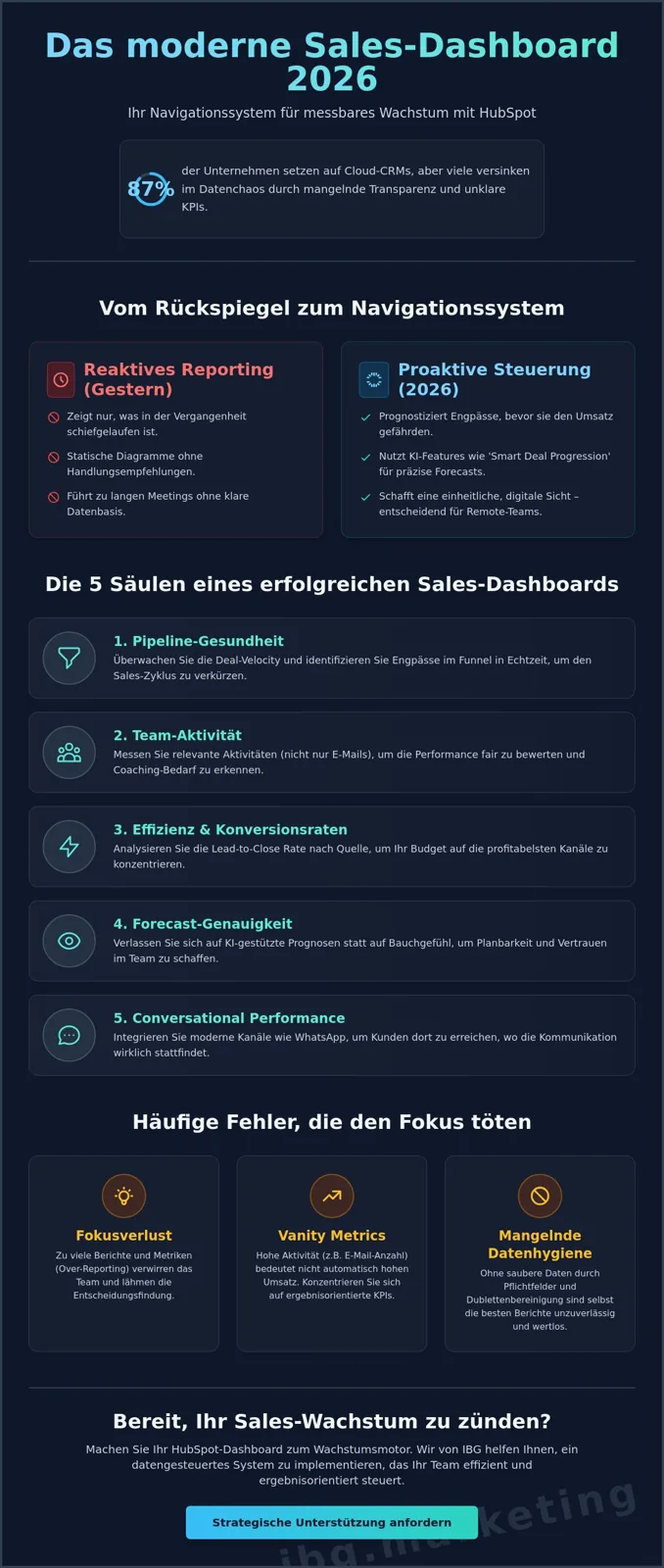
Do you really know why 87% of companies now run cloud-based CRM systems, yet so many sales teams still drown in data chaos? In 2026, a modern sales dashboard is no longer a rear-view mirror. It is a precise navigation system for your growth. If you want to build an effective HubSpot sales reporting dashboard, you need to think beyond simple spreadsheets and integrate real conversational commerce data directly.
At IBG - Innovate Business Growth in Munich, we see the same problem again and again with partners like Brera and Bridgewave. A lack of pipeline transparency leads to inaccurate forecasts and missed opportunities. You will surely agree that weekly sales meetings without a clear data foundation are a pure waste of time. For remote teams especially, a unified digital view of performance metrics is now decisive for success.
This guide promises you a clear roadmap for a data-driven HubSpot dashboard that measurably lifts your sales performance in 2026. We show you how to spot bottlenecks in the funnel and dramatically improve forecast accuracy with new AI features like Smart Deal Progression. Find out now which reports you truly need to steer your team efficiently and toward results.
Key Takeaways
• Learn why static charts are obsolete in 2026 and how to rely instead on a proactive navigation system for steering your sales.
• Follow a step-by-step approach to build a custom HubSpot sales reporting dashboard that precisely combines deal velocity with AI-powered forecasts.
• Identify your most profitable revenue sources through deep lead-to-close analysis and optimize your budget allocation with real focus.
• Understand the critical role of data hygiene, using clean required fields and duplicate cleanup to create reliable grounds for decisions.
• Discover how to use the HubSpot Report Builder to map custom sales cycles and instantly surface bottlenecks in the funnel.
Why Standard Dashboards Hold Your Sales Team Back in 2026
A modern sales dashboard is far more than a collection of colorful charts. In 2026, it acts as the central nervous system for your entire team's growth. Anyone building a HubSpot sales reporting dashboard today cannot rely on static hindsight. Instead, the goal is to connect the fundamentals of sales management with agile, real-time technology.
The decisive difference lies in the shift from reactive reporting to proactive steering. While classic reports only show what went wrong last month, modern systems predict bottlenecks before they put revenue at risk. For agile startups with 5 to 15 employees, that means a real edge in a tough market.
To understand this concept better, take a look at this helpful video:
Data quality is the foundation of every analysis. Your dashboard is only as precise as your day-to-day CRM upkeep. Around 87% of companies do use cloud-based systems, yet many fail because of incomplete records. Only when required fields and processes are clearly defined does HubSpot deliver the insights you need for scalable success.
Common Mistakes When Building Dashboards
A major problem is so-called over-reporting. Trying to squeeze 20 different reports onto a single page kills your team's focus. Concentrate instead on action-oriented data rather than pure vanity metrics, like the number of emails sent with no context.
Loss of Focus
Too many metrics confuse your sales reps.
Vanity Metrics
High activity does not automatically mean high closing value.
Lack of Adoption
If the team does not see the benefit, the CRM gets neglected.
The 5 Pillars of Successful Sales Reporting
High-efficiency reporting rests on five core areas: pipeline health, team activity, efficiency, forecast accuracy and conversational performance. Bringing in WhatsApp data in particular becomes ever more important for Munich startups in 2026, so you can reach customers where they truly communicate. At IBG - Innovate Business Growth, we help clients integrate these channels seamlessly into their analysis.
If you are looking for strategic support in building a HubSpot sales reporting dashboard, our HubSpot Agency Guide 2026 will help. There we show how to establish CRM excellence as a genuine growth engine for your company. A clean system is not an end in itself, but the basis for measurable profit.
The 5 Essential KPIs for a Modern Sales Reporting Dashboard
When you build a HubSpot sales reporting dashboard, the metrics you choose decide between success and standstill. Data only becomes valuable when it can be translated directly into action. In agile Munich startups every second counts, which is why your dashboard has to map the most important levers of your sales funnel in real time.
One central figure is deal pipeline velocity. It measures how fast a lead moves from first contact to close. In 2026, speed is a competitive advantage; slow processes often lead the buyer to walk away. Equally critical is the lead-to-close rate by source. Here we use essential sales KPIs to identify which channels actually deliver the highest ROI and where budget is being wasted.
The activity score per rep reveals your team's cadence. This is not just about the number of calls. A modern score weights different interactions such as emails and messenger conversations differently. Finally, high forecast accuracy gives you planning certainty. According to recent studies, companies with a unified data architecture record a 7x increase in case resolution speed, which directly affects the reliability of your revenue forecasts.
Integrating Conversational Sales Metrics
In 2026, WhatsApp marketing is no longer an optional extra but a critical sales channel. In your dashboard you should absolutely track response times and conversion rates within your messenger funnels. Customers now expect real-time communication; whoever wins here secures the deal. Learn more in our guide to WhatsApp Marketing 2026 and how to integrate this data seamlessly into HubSpot.
Using AI-Powered Forecasts in HubSpot
With the HubSpot Spring Spotlight update in April 2026, tools like HubSpot Breeze and Smart Deal Progression were introduced. These AI features analyze call transcripts and automatically suggest CRM updates. Instead of relying on your reps' gut feeling, the AI delivers objective probabilities for every deal. That reduces human error and dramatically improves forecast accuracy. If you need help with the setup, we are glad to support you with our expertise in data analysis and dashboards.
A well-structured dashboard is the compass for your growth. Let us optimize your CRM structure together, so your team keeps its focus on the right deals.
HubSpot Report Builder vs. Standard Templates: What Fits Your Sales Process?
Anyone who wants to build a HubSpot sales reporting dashboard fast usually reaches for the built-in template library on instinct. For getting started, that makes complete sense. But as your team grows and sales cycles get more complex, these standard solutions often hit their limits. As a partner for digital growth in Munich, we at IBG - Innovate Business Growth regularly see that scaling startups reach a point where they need deeper insights that go beyond simple bar charts.
The choice between templates and the Custom Report Builder is ultimately a trade-off between time saved and strategic depth. While templates give you a solid base within five minutes, the Custom Builder lets you connect data from different objects like deals, contacts and activities with precision. That is the prerequisite for real CRM excellence and data-driven scaling.
Comparison Table: Templates vs. Custom Reports
| Criterion | Standard Templates | Custom Report Builder |
|---|---|---|
| Complexity | Low | High |
| Time Required | < 5 minutes | 30 to 60 minutes |
| Flexibility | Limited | Unlimited |
| Best For | Beginners | Scaling Teams |
Best-of: These HubSpot Templates Are Worth It in 2026
For daily motivation and a quick overview, there are two templates that should be in every dashboard. The deal-stage overview instantly shows you where leads are stuck in the funnel. Complement it with the activity leaderboard. It fuels healthy competition in the team by making calls, meetings and messenger interactions transparent. That measurably lifts your cadence and drives an agile way of working.
At a certain point your requirements get more specific. If you need multi-object reports, for example to tie the success of your WhatsApp campaigns directly to deal revenue, outside expertise is often the more efficient route. We help clients like Brera and Bridgewave tame these complex data landscapes. Our experts for data analysis and dashboards make sure you can focus on closing while the system delivers the hard facts.
A tailored system saves you hours of manual work over the long run. It eliminates the guesswork in steering sales. Let us take a look together at how we can optimize your HubSpot process, so your reporting becomes a real growth driver.
Step by Step: How to Build a High-Efficiency HubSpot Sales Dashboard
Building a dashboard is not a purely technical task. It is a strategic decision. When you build a HubSpot sales reporting dashboard, you need to plan the process cleanly from goal-setting to daily use. An unstructured board only leads to confusion and gets ignored by your team.
Step 1: Define your goals.
Who uses the dashboard? A VP of Sales needs strategic forecasts and revenue targets, while an SDR needs to keep an eye on daily activities and quotas.
Step 2: Clean up your data sources.
Duplicates are the enemy of every analysis. Define clear required fields in the CRM, so only complete records flow into your reports.
Step 3: Build your reports.
Use the full power of HubSpot to answer specific questions that go beyond standard metrics.
Step 4: Optimize the layout.
Use the proven F-layout. Place the most critical KPIs at the top left, because that is where the human eye lands first.
Step 5: Permissions and delivery.
Set up automated email sends. That way every stakeholder gets the most important numbers in their inbox on Monday morning.
Technical Setup of the Custom Report Builder
In the Custom Report Builder you first choose your primary and secondary objects. For most sales dashboards, the combination of deals and contacts is ideal. Pay meticulous attention to the filter logic. Wrongly set date ranges distort your entire pipeline velocity. Choose the visualization to match the metric: bar charts are perfect for team comparisons, while line charts make trends over time visible. A funnel chart, on the other hand, is unbeatable for visualizing conversion rates between deal stages.
Dashboard Automation for Agile Teams
Agile startups in Munich live on speed. Connect your dashboard to Slack so you get notified instantly about important updates. For integrating external data sources like ERP systems or specialized lead tools, we recommend Marketing Automation with Zapier. That saves manual data upkeep and eliminates sources of error. Document your dashboard structure internally, ideally with WebP screenshots; that gives new team members quick orientation and creates transparency about the filters in use.
Want to take your sales processes to the next level? Let us professionalize your HubSpot infrastructure together and achieve real CRM excellence.
CRM Excellence from Munich: Using Your HubSpot Dashboard as a Growth Engine
In Munich's dynamic startup scene, standing still means falling behind. At IBG Marketing we do not see ourselves as a pure agency, but as a strategic partner for your success. When we build a HubSpot sales reporting dashboard for clients like Brera or Bridgewave, measurable scaling is always at the center. A professional implementation makes sure your data does not just exist, but actively grows your revenue.
The move from mere data collection to real CRM excellence happens through transparency. Dashboards eliminate the guesswork in sales meetings. Instead of debating assumptions, you focus on hard facts. That not only improves forecast accuracy, it strengthens the whole company culture through objective wins.
Custom Dashboards for Different Sales Roles
A one-size-fits-all dashboard rarely does justice to the different demands within your team. We rely on role-based views to guarantee maximum relevance:
The SDR Dashboard
Here the focus is on daily cadence. Outbound activity, the efficiency of first outreach and the number of qualified meetings are the central metrics.
The Account Executive Dashboard
This board concentrates on pipeline hygiene and closing. It instantly shows which deals are stalling and where the highest close probability lies.
The Management Dashboard
For decision-makers, ROI, customer acquisition costs (CAC) and scalability are what count. Here, data from data analysis and dashboards comes together to paint the big picture.
Companies that rely on such a specialized data architecture often record a 4.5x improvement in first response time. In 2026, that is a decisive factor for closing leads ahead of the competition.
Next Steps: Your Path to Data-Driven Sales
The road to market leadership begins with an honest audit of your current HubSpot instance. We analyze your processes and uncover potential that was previously hidden in data chaos. Combine your sales insights with the right marketing KPIs for 2026 to gain a complete view of your entire customer journey.
Let us unlock the full potential of your CRM together. A clean setup is the basis for every growth experiment and every scaling phase. Your team deserves tools that make work easier instead of getting in the way.
Book a free strategy call now. Let us scale your sales funnel together in 2026, get in touch here.
Meta Title: Build a HubSpot Sales Dashboard 2026 | IBG Marketing
Meta Description: Learn how to build a HubSpot reporting dashboard for sales teams. Maximum transparency and performance for Munich startups. Read now!
Which HubSpot license do I need for sales dashboards?
How often should a sales dashboard be updated?
Can I integrate WhatsApp data into my HubSpot dashboard?
Take Your Sales Performance to the Next Level in 2026
A modern sales dashboard is far more than a simple visualization; it is the strategic compass for your entire team. Today, success depends on whether you go beyond standard templates and integrate real conversational commerce data along with AI-powered forecasts. Anyone who wants to build a professional HubSpot sales reporting dashboard creates the necessary basis for sustainable scaling and a transparent company culture.
As experts for HubSpot CRM implementation in Munich, we help agile startups turn technical potential into measurable ROI. Our experience with clients like Brera and Bridgewave shows that a clean data setup dramatically boosts efficiency in sales meetings. Do not settle any longer for vague estimates when you could be using precise, real-time insights.
Let us optimize your HubSpot sales dashboard together in 2026 – get in touch here.
Your path to data-driven success starts now. We look forward to becoming your partner for CRM excellence and leading your team to the win.
Frequently Asked Questions About HubSpot Sales Reporting
How many reports should a HubSpot sales dashboard contain at most?
A high-efficiency dashboard should include no more than 8 to 10 reports, so you do not put your team's focus at risk. Too many data points often lead to so-called analysis paralysis, where staff lose the overview amid all the numbers. When you build a HubSpot sales reporting dashboard, place the three most critical KPIs at the very top left. For deeper analysis, it is smarter to set up separate views for different roles like SDRs or sales managers.
Can I integrate external data into my HubSpot sales dashboard?
Yes. Bringing in external data from sources like Google Ads, Meta or specialized ERP systems is easy through native connectors. Information from WhatsApp marketing can also be integrated to map the entire conversational journey. For complex data landscapes, we use automation tools like Zapier to move information from third-party systems seamlessly into HubSpot. This creates a unified data foundation for well-grounded, real-time decisions.
Which HubSpot license do I need for the Custom Report Builder?
The Custom Report Builder is available from the Professional tier of the Sales Hub. Since the Spring Spotlight update in April 2026, many of the advanced AI functions, such as Smart Deal Progression, are exclusive to the Professional and Enterprise tiers. These versions let you build complex multi-object reports. That is especially important for scaling startups in Munich that need to connect data from deals, contacts and custom objects flexibly.
How do I make sure my sales team actually uses the dashboard?
Team adoption rises by around 65% when you involve staff directly in the build process. A dashboard must not be seen as a pure surveillance tool; it has to make everyday sales work noticeably easier. Bring in motivating elements like activity leaderboards and show how clean data leads directly to better forecasts. Once the team sees that reporting helps them prioritize lucrative deals, it becomes an indispensable tool.
Are there ready-made dashboard templates for startups in HubSpot?
HubSpot offers a library of more than 50 predefined templates tailored specifically to the needs of sales teams. These templates cover standard requirements like pipeline velocity and revenue forecasts excellently. We recommend that startups use these templates as a base and adapt them step by step to their own individual sales process. That way you get first results quickly, without giving up the strategic depth your specific business model needs.
How often should sales dashboards be updated or reviewed?
While the data in HubSpot refreshes automatically in real time, you should review the strategic structure of your dashboard every three months. A quarterly audit makes sure the tracked metrics still pay into your current growth goals. Since sales cycles and market conditions change rapidly in 2026, your HubSpot sales reporting dashboard stays a dynamic instrument this way. Outdated reports should be removed consistently to keep things clear over the long term.
Turn this into results.
Branding, lead generation and done-for-you funnels, engineered with AI, live in weeks.
Book a free callChat on WhatsAppKeep reading

How to Set Up Automated Lead Rotation in HubSpot 2026: The Ultimate Guide
Set up automated lead rotation in HubSpot for 2026: cut response times, distribute leads fairly, and scale your sales team without
Read · 13 min →
Generating B2B Leads With Google Ads 2026: Strategies for Scaled Growth
Learn how to generate B2B leads with Google Ads in 2026: precise targeting, CRM automation with HubSpot and Zapier, and WhatsApp f
Read · 16 min →
CRM Implementation Checklist 2026: The Ultimate Guide for Agile Startups
Skip the costly CRM mistakes. This 2026 implementation checklist walks agile startups through strategy, data migration, and change
Read · 15 min →